
Meetheage Sign Up: How to Build a Strong Profile and Start Connecting

Making a profile on Meetheage is the first step in meeting new people and starting a conversation that really matters. Whether you are looking for casual conversation or something a little more serious, a well-thought-out profile makes the entire experience easier and more enjoyable.
Enjoy friendly conversations on Meetheage
In this comprehensive guide, you will be able to understand the process of completing the sign-in process on Meetheage, as well as the recovery process. This will be followed by a discussion on how you can improve your profile for easier communication.
What Is Meetheage?
Meetheage is a communication platform where users can communicate with people from different locations and build connections based on common interests. It is a digital communication platform, just like any other modern digital communication platform.
As online interaction continues to grow globally, platforms like Meetheage have become part of everyday communication. They allow individuals to expand their social circles beyond geographical limits in a controlled and organized environment.
Preparing for Meetheage Sign Up
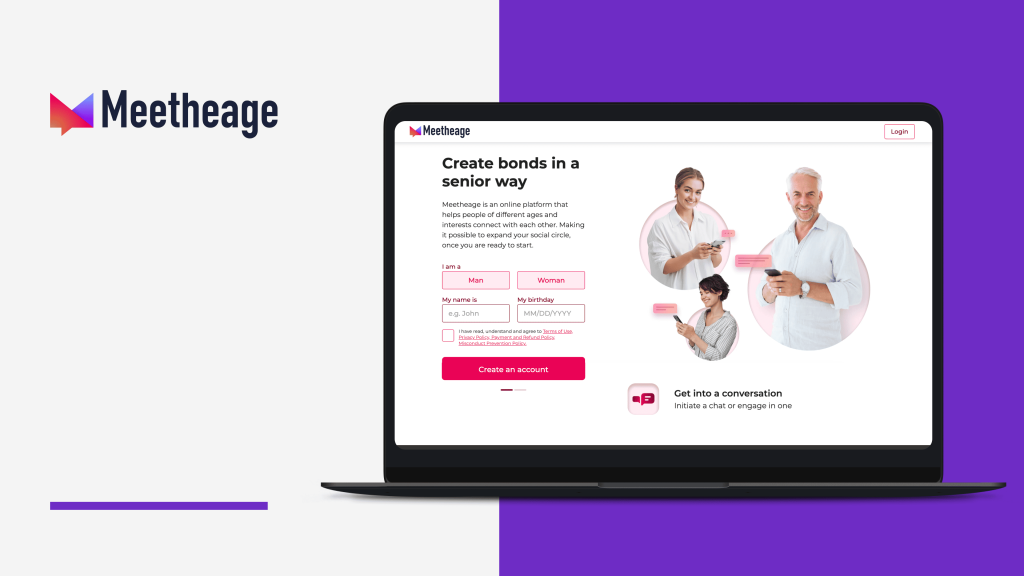
Before beginning the registration process, it is helpful to prepare a few essential details. Having everything ready reduces interruptions and makes the process faster.
A valid email address is required for verification and future account recovery. This email should be one that you actively use, as important notifications and security updates may be sent there.
It is also recommended to think about your password in advance. Choosing something secure but memorable helps avoid login problems later.
Additionally, preparing a clear and appropriate profile photo can save time after registration. Since the profile photo plays a major role in first impressions, selecting one thoughtfully is important.
Meetheage Registration Process: Step-by-Step Overview
The registration process on Meetheage is straightforward and structured. Below is a clear breakdown of each stage.
Registration Steps on Meetheage
| Step | Action Required | Purpose |
|---|---|---|
| Step 1 | Open the official Meetheage website | Access the registration page |
| Step 2 | Fill in basic information (name, birth date, email, password) | Create account |
| Step 3 | Confirm email address via code or link | Verify identity and activate account |
| Step 4 | Complete profile details | Improve visibility and engagement |
Step 1: Access the Website
Start by visiting the official homepage of the company. On the main page, you will see a Meetheage sign-up or registration button. Clicking it opens the account creation form.
Step 2: Provide Basic Information
The registration form typically asks for:
- Name
- Date of birth
- Email address
- Password
It is important to enter accurate information, as this forms the foundation of your profile. Your email and password will be used every time you Meetheage sign in.
Step 3: Email Confirmation
After submitting the form, a confirmation message is sent to your email. You will either receive a verification link or a confirmation code.
This step ensures that the email belongs to you and helps prevent fake or inactive accounts. Once confirmed, your account becomes active and ready for use. For users creating a Meetheage new account, this step finalizes the setup and allows immediate access to the platform.
Enjoy friendly conversations on Meetheage
Creating an Attractive Profile
While registration enables your account, setting up your profile makes it interesting. A good profile increases interaction.
Profile Photo
Your profile photo comes after the Meetheage register steps. A good photo with good lighting and a few filters makes it look authentic. Do not use group photos or heavily edited images to avoid confusion.
A natural expression and a neutral background often work best. Profiles with high-quality images generally receive more responses.
Personal Description
The description section allows you to express personality. Instead of writing a very short or generic line, take a moment to describe:
- Your interests
- Hobbies
- Lifestyle preferences
- What kind of conversations do you enjoy
A thoughtful description creates conversation starters. It also helps others decide whether your interests align.
Additional Profile Information
Some communication platforms provide the option of adding more information about the user. This information may include the user’s interests, languages they can communicate in, etc. Adding information to the user’s account increases the quality of the search results. It also adds to the credibility of the user’s account. Users who take the time to fill out their accounts tend to have a more efficient communication process.
Enjoy friendly conversations on Meetheage
Meetheage Website Login
After successful registration, logging in becomes simple. To access your account, open the homepage and click the Meetheage login button. Enter your registered email and password, then click “Log In.” Once authenticated, you gain access to your messages and profile dashboard.
For convenience, some users may choose Meetheage web login options if they are accessing the platform from different devices. However, it is recommended to avoid saving login credentials on public or shared devices.
Forgot Meetheage Password?
Forgetting a password is common, and Meetheage provides a recovery option to restore access.
- Click the Meetheage login forgot password link.
- Enter your registered email address.
- Check your inbox for reset instructions.
- Follow the steps provided in the email and create a new secure password.
This process allows users to regain access without creating a new account, preserving conversations and profile history.
Start Your Connection Journey on Meetheage
Find a space where you can truly be yourself while connecting with others. Meetheage makes it easy to explore interesting people and spark conversations that feel natural.

Account Security Best Practices
Online safety is essential for a stable communication experience. Choosing a secure password and practicing responsible behavior reduces potential risks.
Strong Password Guidelines
| Security Element | Recommendation | Why It Matters |
|---|---|---|
| Length | Minimum 8–12 characters | Longer passwords are harder to guess |
| Character Variety | Mix uppercase, lowercase, numbers, symbols | Increases complexity |
| Personal Data | Avoid names, birth dates | Prevents easy prediction |
| Reuse | Do not reuse passwords across platforms | Reduces cross-platform risk |
In addition to password strength, it is advisable to update passwords periodically and avoid sharing account credentials with others.
Managing Your Account
Once logged in, users can manage their profiles or even decide to leave the platform. If you’re wondering how to delete the Meetheage account, instructions are available in account settings. These steps help remove personal data and disable your profile if needed.
Communicating Effectively on Meetheage
Once logged in, communication becomes the core experience. Thoughtful first messages increase the likelihood of receiving a response. Referencing something from another user’s profile demonstrates genuine interest.
Balanced dialogue—where both participants share and respond—creates more meaningful interactions.
Exploring Profiles and Finding Matches
Meetheage allows users to browse and search profiles based on interests and preferences. Reading descriptions thoroughly helps identify shared hobbies and compatible personalities. Profiles that are complete and thoughtfully written often indicate users who are interested in communication.
Enjoy friendly conversations on Meetheage
Maintaining a Profile Over Time
Updating profile information, refreshing photos, and reviewing privacy settings ensure the account remains accurate and secure. Periodic adjustments signal active participation and improve your chances of engagement.
Summary
Meetheage sign-up process involves several steps yet remains user-friendly. Understanding account recovery through Meetheage login forgot password button, security best practices, and options to delete account gives users full control over their online experience.
After setting up a Meetheage new account, following these steps helps users communicate effectively and confidently. Proper account management ensures your experience on the website remains safe, engaging, and productive.
welcome offer
FAQ
Is Meetheage Login Free?
Yes! You can access basic features on Meetheage without paying. The login option allows users to explore the platform and browse profiles.
Can I Use Meetheage Without Signing Up?
To communicate with other users, send messages, or access full profile features, you need to create an account. Using Meetheage without signing up only allows limited browsing, but you won’t be able to interact fully.
How Do I Recover My Meetheage Account If I Forget My Password?
You can use the Meetheage login forgot password feature. On the login page, click the link, enter your registered email, and follow the instructions in the email to reset your password. This keeps your existing conversations and profile intact.